Bravo Platform User Guide : Setting up the Bravo Platform : Starting up and shutting down

Starting up and shutting down
 
 
About this topic
This topic describes how to start up and shut down the Bravo Platform when you are operating it as a standalone device. For instructions on how to turn on and turn off the Bravo Platform when it is integrated into a workstation or system, see the workstation or system user documentation.
Starting up the Bravo Platform
 
*Always turn off the Bravo Platform before installing or uninstalling a liquid-handling head. Failure to do so can damage the head electronics.
 
To start up the Bravo Platform:
1
2
3
4
5
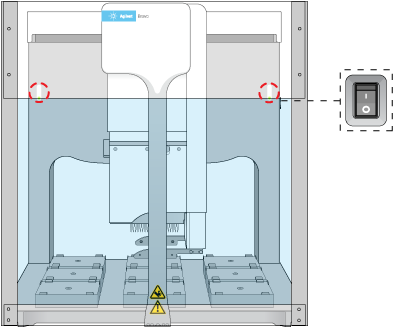
On the side of the Bravo Platform, press the power switch to the on (|) position.
The front panel status lights turn blue.
Note: If the emergency-stop pendant is pressed or absent, the status lights will turn red.
Figure. Bravo status lights and power switch
 
6
Start the VWorks software.
Shutting down the Bravo Platform
Shut down the Bravo Platform before you:
Clean the Bravo Platform
Move the Bravo Platform
 
*Always turn off the Bravo Platform before installing or uninstalling a liquid-handling head. Failure to do so can damage the head electronics.
 
To shut down the Bravo Platform:
1
2
3
4
5
6
On the side of the Bravo Platform, press the power switch to the off (o) position.
7
 
 
Related information
 
Initializing the Bravo device
Turning on or off Bravo accessories
Setting up the Bravo Platform