|
|
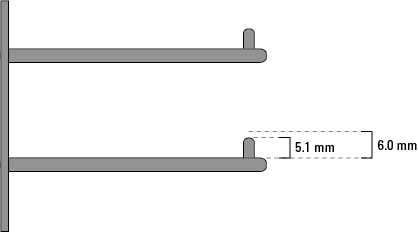
After setting the Labware MiniHub home position, you set the robot teachpoints at each shelf in cassette 1. To set, edit, and verify robot teachpoints, see the robot user guide, for example, the BenchCel Microplate Handler User Guide.IMPORTANT Before setting the robot teachpoints, make sure the Labware MiniHub motor is enabled. For instructions, see Enabling and disabling the motor. In addition, make sure the Labware MiniHub is at its home position. For instructions, see Rotating the MiniHub to a specific position.BenchCel Configuration only. Ensure that the labware definitions specify that the Stack holding method is set to Hold with stacker grippers to ensure precision performance.IMPORTANT For each teachpoint, set the approach height such that it is greater than the height of the locating pins on the MiniHub shelf and less than the shelf directly above. For example, the locating pins are 5.1 mm tall, so the minimum approach height should be 6 mm if single spacers are used between shelves.