Vertical Pipetting Station User Guide : Installing Vertical Pipetting Station : Connecting the power and the computer

Connecting the power and the computer
About this topic
This topic provides instructions on how to connect the Vertical Pipetting Station to a grounded power source and to its controlling computer.
Before you begin
Before you plug in the Vertical Pipetting Station, make sure the laboratory set up requirements have been met. See Laboratory requirements.
 
 
CAUTION Operating the Vertical Pipetting Station at the wrong voltage might seriously damage the device.
Connecting the power and computer
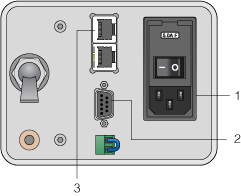
The following figure shows the connections on the rear panel.
Figure. Vertical Pipetting Station rear panel
 
 
To connect the Vertical Pipetting Station:
1
Connect the Vertical Pipetting Station power cable by plugging in one end of the cable at the AC power connector on the rear panel as the figure shows. Plug in the other end of the cable at an appropriately grounded electrical socket.
2
Connect the Vertical Pipetting Station serial communications cable by plugging in one end of the cable at the serial communications port on the Vertical Pipetting Station rear panel as the figure shows. Plug in the other end of the cable to the computer that controls the Vertical Pipetting Station.
Be sure to tighten the thumbscrews on the connector.
3
If you are using the Automation Solutions Pump Module, see Setting up a Pump Module for connection details.
Related topics
 
How to set up the Vertical Pipetting Station