Vertical Pipetting Station User Guide : Installing Vertical Pipetting Station : Installing a pipette head

Installing a pipette head
About this topic
This topic describes how to install the pipette head when you set up the Vertical Pipetting Station. For details on how to replace a pipette head that is already mounted on the device, see Changing the pipette head.
About the pipette head mount
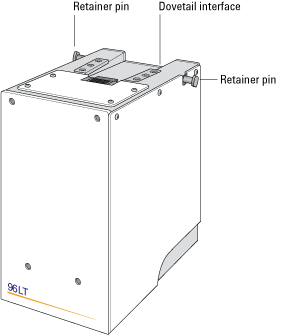
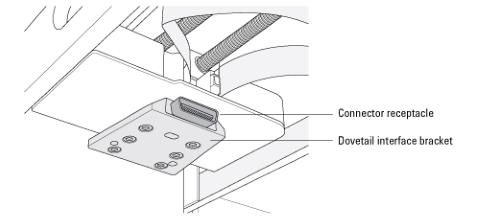
The pipette head fits onto the head mount using a dovetail interface, shown in the following figures. The 96‑ and 384‑channel pipette heads have two head-retainer pins that secure the head in the head mount. The 8‑ and 16‑channel pipette heads have a lock on the front of the head.
Figure. Pipette head
 
Figure. Vertical Pipetting Station head mount (bottom view)
 
Installing the pipette head
 
CAUTION Always turn off the Vertical Pipetting Station before installing or removing a pipette head. Failure to turn off the Vertical Pipetting Station before installing or removing a pipette head can damage the pipette head electronics.
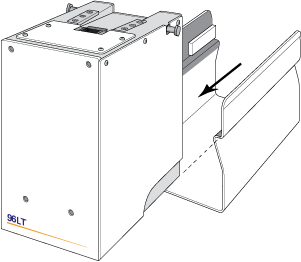
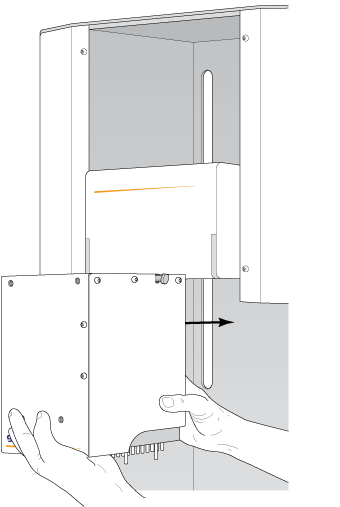
To install the pipette head on the head mount:
1
Verify that the head mount of the Vertical Pipetting Station is in an easily accessible position.
The Vertical Pipetting Station ships with the head mount already in position for easy access.
2
On the Vertical Pipetting Station rear panel, ensure the power switch is set to off (o).
3
 
4
a
b
 
5
 
6
7
 
 
Related topics
 
Starting up the Vertical Pipetting Station