|
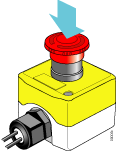
This topic describes how to stop the pipette head in an emergency. The procedure can vary for an integrated device in a lab automation system. For details, see the user guide for your lab automation system, such as the BioCel System User Guide.
WARNING The Vertical Pipetting Station should be fitted with a robot-disable pendant positioned at the front of the device for easy access. You can acquire a robot-disable pendant from Agilent Technologies. The pendant connects to the robot-disable circuit loop on the rear panel of the Vertical Pipetting Station.When you perform an emergency stop, the internal logic of the Vertical Pipetting Station is preserved, which makes it possible to resume a protocol. However, if you turn off the power switch, the internal logic is lost until you reinitialize the Vertical Pipetting Station.
CAUTION Do not turn off the power switch on the rear panel of the Vertical Pipetting Station to stop a run. When you turn on the power again, the protocol cannot resume, and the shelf movement could result in a pipette head crash.IMPORTANT Do not use the emergency stop procedure for a normal stop or to pause and continue a run. The pipetting accuracy of the running protocol might be impaired. For a normal stop or to pause a run, use the Stop button or Pause button in the VWorks software.
• Activates the z‑axis brake to prevent the pipette head from falling
1
• Abort—Cancels the protocol.
• Retry—Attempts to resume the protocol.
• Ignore and Continue—Ignores the error condition and attempts to perform the next command.