Vertical Pipetting Station User Guide : Using Diagnostics software : Homing the pipette head

Homing the pipette head
About this topic
This topic describes when and how to home the pipette head. The procedure is the same whether or not a pipette head is mounted on the Vertical Pipetting Station.
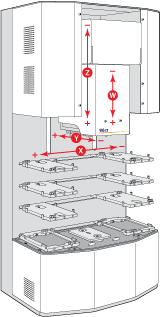
The Vertical Pipetting Station has a defined home position for each of the four axes of motion. Homing sends the pipette head to the home position for the specified axes.
When to do this
When you first initialize the Vertical Pipetting Station after startup, the pipette head automatically homes. You may also want to home the pipette head to:
Reset the axes. For example, if you notice the Vertical Pipetting Station is not moving to locations or teachpoints accurately, home the pipette head.
Homing the pipette head
Anytime that you initialize a profile, the pipette head homes the z‑axis first and then homes the other axes. You can also home the pipette head using the following procedures.
 
WARNING  Stay clear of the Vertical Pipetting Station while it is in motion. Never touch any of the moving parts or attempt to move labware while the Vertical Pipetting Station is in operation. The device could pinch, pierce, or bruise you. For example, a pipette tip could pierce your hand.
 
To home the head in all axes:
1
In Vertical Pipetting Station Diagnostics, click the Jog/Teach tab.
2
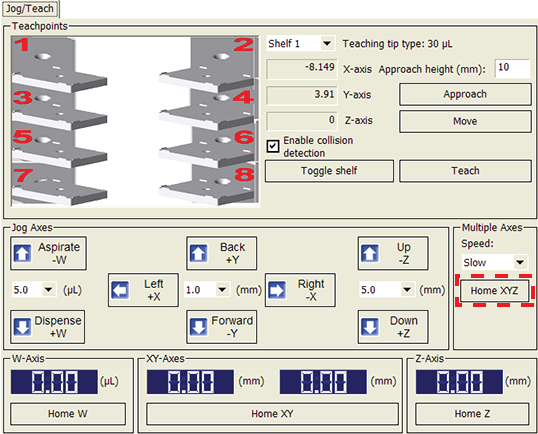
Under Multiple Axes, click Home XYZ.
 
To home the head in each axis individually:
1
In Vertical Pipetting Station Diagnostics, click the Jog/Teach tab.
2
Click a Home button to move the pipette head in the corresponding direction.
Home W moves the internal head syringe mechanism to its home position.
Home XY moves the pipette head to its xy‑axes (horizontal) home positions.
Home Z moves the head to its z‑axis (vertical) home position.
A value of 0.00 appears in the digital display when the head mount is in the home position for the given axis.
Figure. Pipette head axes of motion
 
Related topics