Vertical Pipetting Station User Guide : Using Diagnostics software : Jogging the pipette head

Jogging the pipette head
About this topic
IMPORTANT Only administrators and experienced personnel should use this procedure.
Jogging moves the pipette head incrementally along the xy‑axes, z‑axis, or w‑axis. Jogging the head is useful for setting teachpoints and performing maintenance activities.
Before you begin
 
WARNING  Stay clear or the Vertical Pipetting Station when the pipette head is moving or about to move. In particular, the z-axis motor is powerful and a pipette tip could pierce your hand.
 
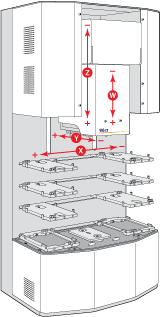
The Jog/Teach tab provides the controls for jogging the pipette head. The labeling conventions for the axes of motion are as follows.
 
Jogging the pipette head
 
To jog the pipette head:
1
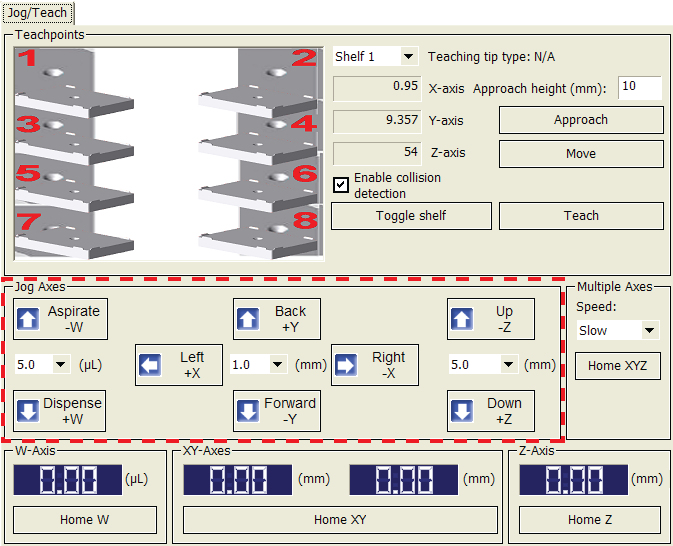
In Vertical Pipetting Station Diagnostics, click the Jog/Teach tab.
2
Under Multiple Axes, select the Speed.
3
Under Jog Axes, select an increment in distance (mm) or (µL) list for the corresponding axis of movement.
For example, to jog the pipette head vertically, select an increment from the list (mm) located between the Up –Z and Down +Z buttons.
 
4
For example, click Up –Z or Down +Z to move the pipette vertically.
The digital display shows the distance that the pipette head traveled from the home position.
Related topics